INSTRUMENTS / GENERATORS & EFFECTS
FL Studio Mobile Rack
FL Studio Mobile Rack brings all FL Studio Mobile instruments and effects into FL Studio. It's similar to Patcher, allowing you to combine multiple instruments and effects into flexible, modular chains. You can save custom presets, making your preferred configurations easy to recall in future projects. If you own FL Studio Mobile, Mobile Rack is the technology that enables accurate project translation when loading your Mobile projects in FL Studio, as it's the same plugins as you get in Mobile.
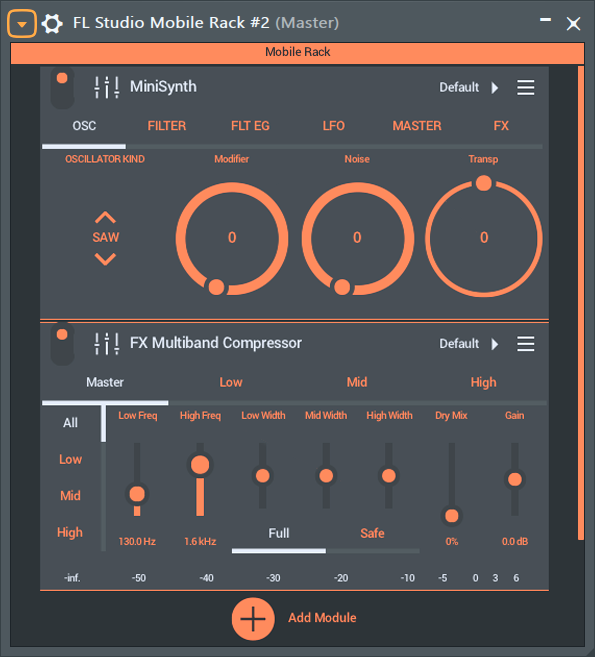
Click the (+) Add Module icon to choose Instruments and Effects from the list below.
Automation
To automate a parameter or link to a controller:
- (Right-Click) the target control and select 'Activate'
- Open the Browser to Current project > Generators > FL Studio Mobile Rack and select the FL Studio Mobile Rack instance you are using.
- 'Activated' target control/s will be shown in the list below the instance. (Right-Click) the target and choose 'Create automation clip' or 'Link to controller' etc.
Instruments
All instruments are included free:
- 3x Osc - 3x Osc is a deceptively powerful 3 x Oscillator, subtractive synthesizer. Presets from the Desktop Version are compatibe.
- DirectWave - This is a sample player and is useful for traditional sounds such as Piano, Orchestra, Guitar etc. There are additional free and for purchase sample banks available in the in-app shop.
- GMS (Groove Machine Synth) - Is a multitimbral hybrid synthesizer & FX channel from the FL Studio (PC), Groove Machine plugin.
- MiniSynth - Is a fully featured synthesizer with a low processor overhead and great sound. There are 1000's of patches available for it on the user forums or you can create your own.
- SoundFont Player - Loads SF2 SoundFont banks, a format created in the mid-1990s. Many free SoundFont banks can be found online, offering a wide range of sounds.
- Slicer - Sample slicer and player. Trigger percussion and melodic loop slices from the Piano roll. There are additional free and for purchase loop packs available in the in-app shop.
- SuperSaw - Is a fully featured synthesizer great to quickly create Electronic Dance Music style sounds including massive stereo pads and leads.
- Transistor Bass - Transistor bass is a monophonic bass-line style synthesizer for creating resonant-style basslines and leads.
Effects
All effects are included free:
- Analyzer - Visualize audio including the Frequency Spectrum, Waveforms (Scope), Loudness (according to various standards), Stereo imaging and Pitch.
- Autoduck - Ducking is a form of automated volume dipping. Use this to create 'sidechain' style effects.
- Pitcher 2 - Real-time pitch-correction, manipulation module that can correct pitch errors in recorded audio or create special effects.
- Chorus - Chorus creates a thicker/lusher sound by detuning multiple voices within the sound.
- Comb - Comb Filter will pitch-tracking for additional creative effects.
- Compressor - Make quiet sounds louder.
- Distortion - Distortion type 'overdrive' typical of guitar amplifiers. It allows high-overdrive even if a track's volume is quiet.
- Equalizer (Parametric) - Advanced 4-Band parametric equalizer.
- Filter - Similar to the Equalizers for creative (automated) effects. Sweeping a filter-cutoff frequency is a very common technique used in electronic dance music (EDM).
- Flanger - Similar to the Chorus effect Flanging allows you to enrich the stereo panorama of your mix.
- Gate - Automated on/off-style volume envelope with control over opening and closing dynamics.
- Graphic EQ - An 8-band equalizer with sliders set to convenient frequency ranges for general equalizing duties.
- Tuned EQ - An 8-band equalizer with the ability to center sliders on notes in the scale for general equalizing duties.
- IAA/Audiobus - Input/Output module for working with Inter App Audio and Audiobus (iOS only).
- Leveller - A precise volume control. Use leveller to monitor levels and to make precise changes to level and stereo panning.
- Limiter - Limiting is a form of heavy compression and maximize the level of a track dramatically.
- Multi FX - Combines Delay, Reverb, Low Pass Filter, High-Pass Filter, Flanger, Phaser, Panner and Vox filter.
- Multiband Compressor - Three-band mastering compression & dynamics processor.
- Parametric EQ - Allows the most accurate equalization of the loudness of specific frequencies in the sound by continuous frequency positioning of the bands.
- Phaser - A moving frequency cancellation effect that you will recognize even if you don't really understand how it works ;)
- Reverb - Reverb simulates a room of a certain type (Hall/Canyon/Room) and size.
- Stereoizer - Stereoizer creates stereo effects from mono sources. Use it to create a 'wider' sounding mix.
- Spacer - Use Spacer to enhance the stereo image of mono input sounds. Use it to create a 'wider' sounding mix.
- Spreader - Creates a stereo effect from mono sources.
- Tape Delay - Delay is an echo style effect and is particularly effective for out-of-tempo experimental delay sounds.
- Tape Stop - Tape or vinyl style start and stop effects. Speed up and slow down.
- Trance Delay - Delay is an echo style effect and is particularly effective when played in sync with the tempo of the track.
- Tremolo - Volume is rapidly varied to create a 'trembling' sound.
- Waveshaper - A wave distortion effect with realtime control.
- Wow & Flutter - Lo-fi cassette tape style artifacts.
Note Effects
All note effects are included free. These Effects manipulate the Note Data that plays Instrument Modules:
- Note Arpeggiator - Turn incoming notes into rhythmic, repeating, and re-pitched patterns.
- Note Echo - Echo Notes in complex and amazing ways.
- Note Randomizer - Randomly affect the Pitch, Velocity and Panning of Notes.
- Note Scale - Snap Notes to a musical Scale, or not!
- Note Transpose - Transppose Notes in Octaves and Semitones.
Registration, why it's important!
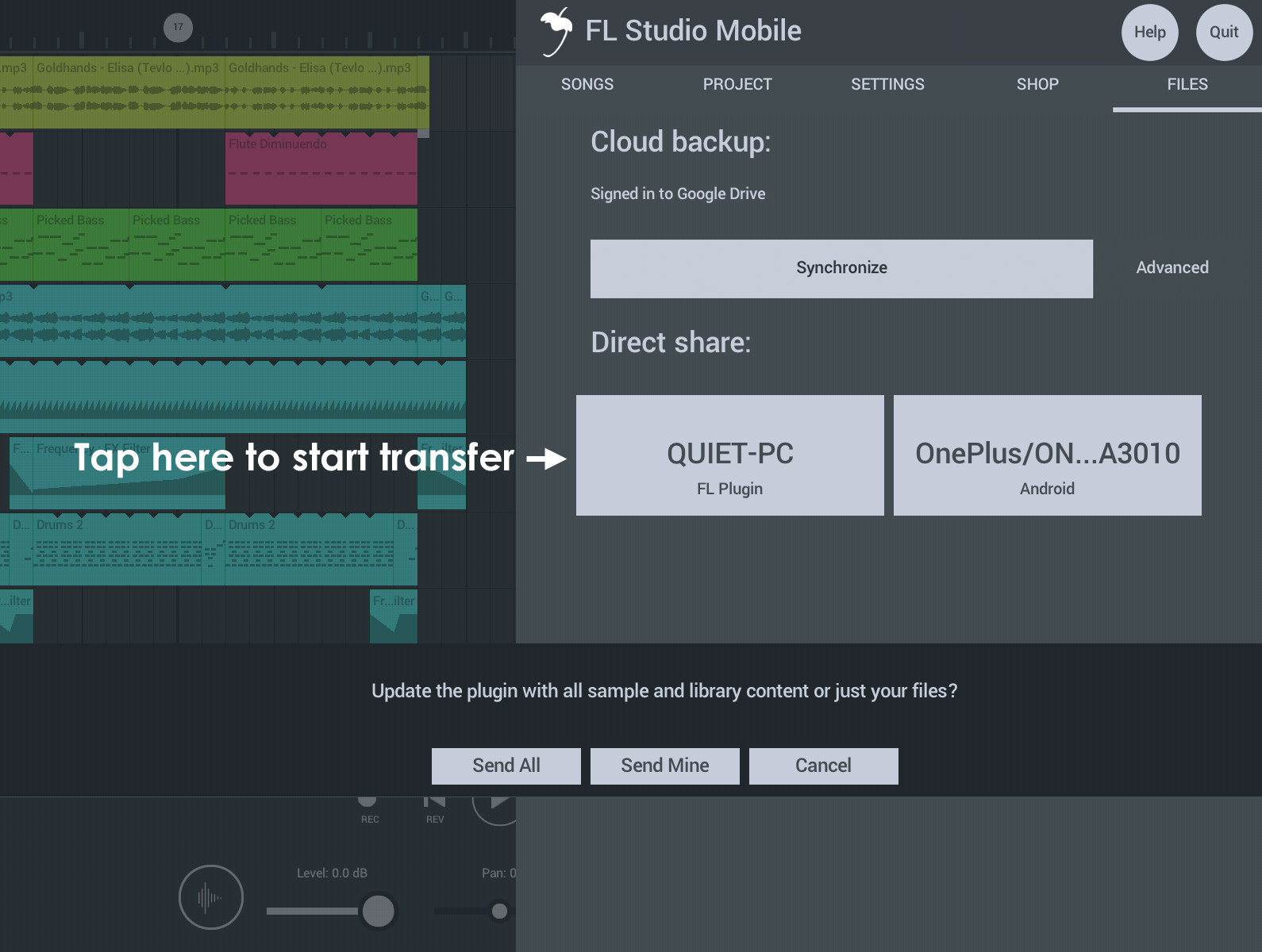
If you own FL Studio Mobile, more content (patches for the DW Sampler) will be available to you. For the best experience, start by transferring your FL Studio Mobile library to desktop. Full details here.
Credits: Maxim Zaev, Nico Berriochoa, Simon Hill, Maxx Claster (original concept), Daniel Schaack & Oliver Habersetzer.